Uptown Funk AI 5 People – Make a Dance Video With Friends
Last updated:
Put yourself and four friends into a high-energy 15-second Uptown Funk street dance. This tutorial covers the five-person reference pipeline: uploading five individual portraits, mapping each friend to their exact standing slot, and verifying that every person keeps their distinct identity across multi-shot camera cuts.
Create your video
1Your crew photos
One photo per person. Photo 1 is the lead; add up to four friends.
1 person · Seedance 2.0 · 720p · 15s · 99 credits
Lead · center
Best results: one person, facing the camera, even lighting, head and shoulders visible. Avoid sunglasses, masks and heavy filters.
2Outfit direction
3Model and resolution
4Length
Your own outfits, the street dance reference.
Center lead and supporting friends mapped without role swap.
Choreography timed to original Uptown Funk soundtrack.
Natural expressions, grounded footwork, zero face blending.
Your photos, your crew
Core Differentiation: Why 5-Person Reference Mapping Works
Most viral AI dance generators only support a single subject or blend group photos into distorted, generic faces. Making an authentic 5-person crew dance requires independent multi-identity injection.
Our Reference-to-Video architecture isolates visual appearance from choreography. The built-in 15-second reference video provides the coordinated kicks, shoulder pops, camera timing, and retro street setting. Five distinct photo slots (@image1 through @image5) map your real friends directly into the dance positions.
To see the real generation result, play the 5-person streetwear remix video above in the interactive showcase (public/demo/uptown-funk-streetwear-15s.mp4). The lead and all four supporting friends dance in perfect sync while keeping their real facial features and street clothing intact.
The 5-Person Lineup: Audience-Perspective Slot Mapping
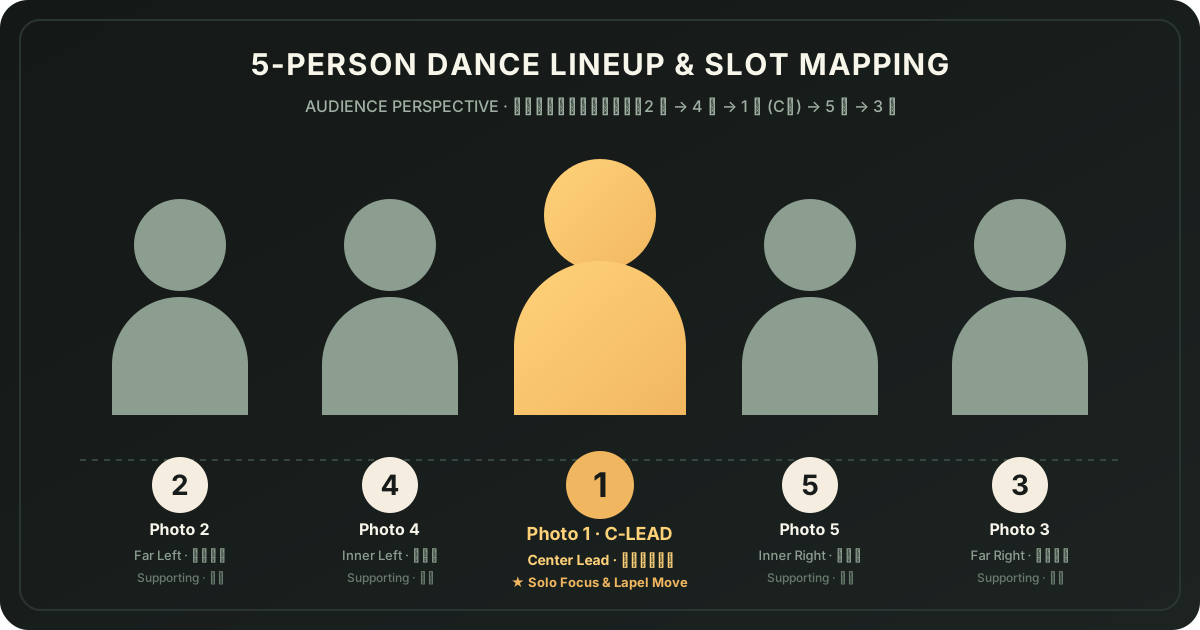
The choreography uses a classic five-person street dance formation. The generator maps your five uploaded photos to fixed visual coordinates from the viewer’s perspective:
• Photo 1 (Center Lead · C-Position): The star of the performance. Stands front and center, guides the opening groove, commands the solo camera push-in and lapel adjustments at 00:06, and anchors the final strut. Put the birthday friend, CEO, or group coordinator in Slot 1.
• Photo 2 (Far Left Wing): The outer left anchor from the audience’s perspective, establishing the left edge of wide lineup shots.
• Photo 4 (Inner Left): Flanks the lead on the left side, matching the center groove with synchronized steps and arm movements.
• Photo 5 (Inner Right): Flanks the lead on the right side, mirroring Slot 4 during group crouches and turns.
• Photo 3 (Far Right Wing): The outer right anchor from the audience’s perspective, framing the right edge of wide street shots.
Key takeaway: From the viewer’s left to right, the physical lineup on screen is 2 → 4 → 1 → 5 → 3. Keep this order in mind when planning your friends’ positions.
Step 1: Photo Guidelines for 5 Distinct Identities
Identity consistency across dynamic dance movement depends directly on the quality of your input photos. For each of the five slots, follow these criteria:
1. One Person Per Photo: Always upload individual portraits. Never use a group photo cropped down or attempt to put multiple friends into a single slot.
2. Clear, Front-Facing Portraits: Choose photos with unobstructed faces, natural lighting, and visible head and upper torso. Frontal angles give multimodal models the strongest landmark data for eyes, nose, jawline, and hairstyle.
3. Avoid Occlusions: Skip photos with sunglasses, heavy hats, face masks, extreme shadows, or intense beauty filters that smooth out recognizable features.
4. Respect Consent: Confirm that every person pictured is an adult who consented to participating in this video remix.
Supported file formats include JPG, PNG, and WebP, up to 10 MB per image.
Step 2: Selecting 5 People and Uploading to Slots in the Generator
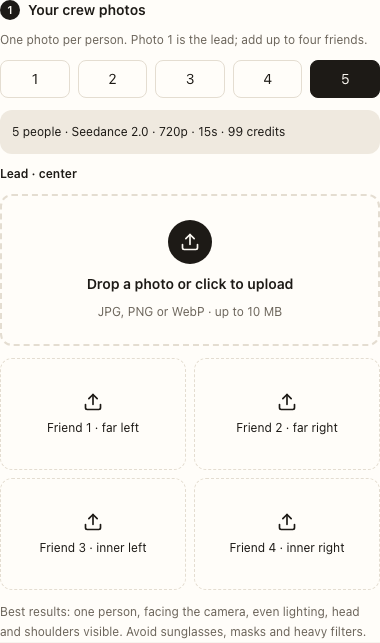
Scroll to the generator section on this page (or the home page) and configure your crew:
1. Select 5 in People to replace: Clicking the 5 button expands the interface from a solo dancer to the complete 5-slot lineup.
2. Upload Slot 1 (Lead · Center): Click the main dashed drop zone to select the photo for the center lead. A thumbnail preview confirms the upload.
3. Upload Slots 2, 3, 4, 5: Click each of the four supporting slot buttons below to assign your four friends to their outer and inner positions.
4. Choose Outfit Direction: Select "Keep my look" to retain your friends’ everyday streetwear, or pick "Retro suits" for a coordinated 1980s look with matching jackets and trousers.
5. Choose Model & Resolution: For a 5-person generation, we recommend Seedance 2.0 720p or 1080p, or Kling 4.0 720p. Check the displayed credit cost, verify consent, and click generate.
Step 3: Multi-Cut Video Breakdown & Checking Identity Consistency
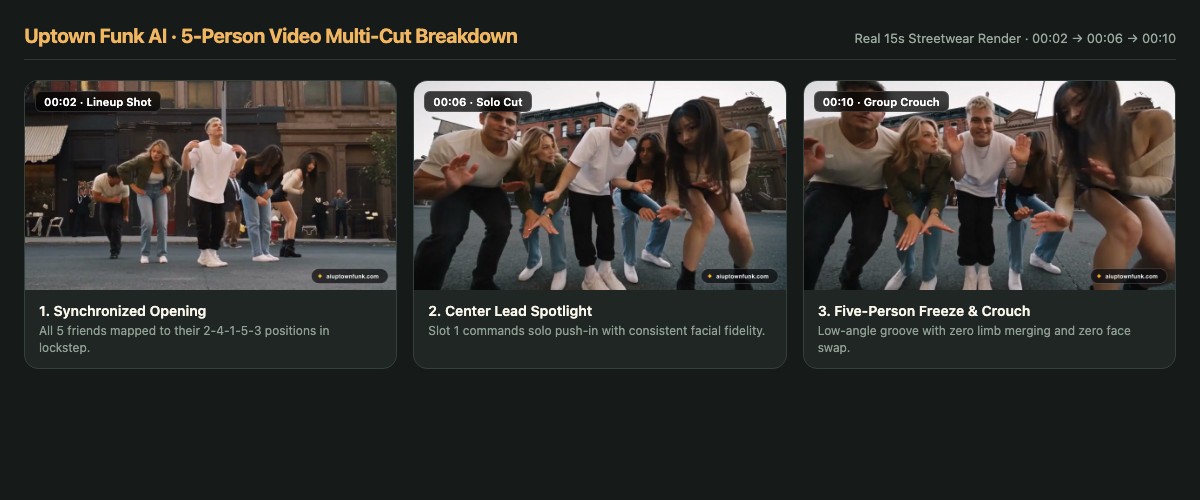
When your 15-second MP4 finishes rendering, watch the full video and evaluate identity retention across the choreography cuts:
• Opening Lineup (00:00 – 00:04): Verify the full 2-4-1-5-3 wide street view. Each friend should be clearly recognizable in their respective position with realistic body proportions and grounded footwork.
• Center Lead Solo Cut (00:05 – 00:08): The camera zooms into Slot 1 for shoulder pops and lapel adjustments. Check that the lead’s facial structure, hair color, and expression remain stable without drifting or morphing into another dancer.
• Synchronized Group Crouch (00:09 – 00:12): The camera returns to a wide low-angle view as the five dancers drop into a deep crouch in lockstep. Confirm that limbs do not clip or merge, hands maintain natural five-finger anatomy, and dancers do not swap identities during the low-angle transition.
• Final Groove & Ending Pose (00:13 – 00:15): The group strides forward into the final pose while the site seamlessly restores the original high-fidelity stereo soundtrack.
Troubleshooting: What to Do If Faces Swap or Drift
While our prompt pipeline enforces strict constraints (NO ROLE SWAP, NO FACE BLENDING, 5 fingers per hand), multimodal video models can occasionally produce edge-case artifacts:
• If two friends swap places after a cut: Double check your original slot assignment. If two friends have very similar hairstyles or clothing in their input photos, the model may experience cross-attention confusion. Replace one photo with a more contrasting portrait (different outfit color or angle) while keeping the slot order identical.
• If facial features blur in the wide shot: Wide shots fit five dancers into a 16:9 frame, so each face occupies fewer pixels. Choose the 1080p tier or test Kling 4.0 720p for enhanced facial edge sharpness.
• Cost & Guarantee Policy: Adding more people does not increase the render credit cost. Every completed attempt uses credits based on the model tier; failed generation jobs automatically refund the deducted credits.
• Sharing & Rights: Download your video within 30 days. Before posting to TikTok, Instagram Reels, or YouTube Shorts, ensure all four friends approve the clip, clearly label it as AI-generated, and check soundtrack rights for your channel.
Your crew. The Uptown Funk routine.
Create my crew video